Steps to STOP Oracle EBS 12.2.x Application Services:
1. Connect Putty to Application Sever IP:
2. Login with Application OS User ( Username / password ) and source EBS Application Env
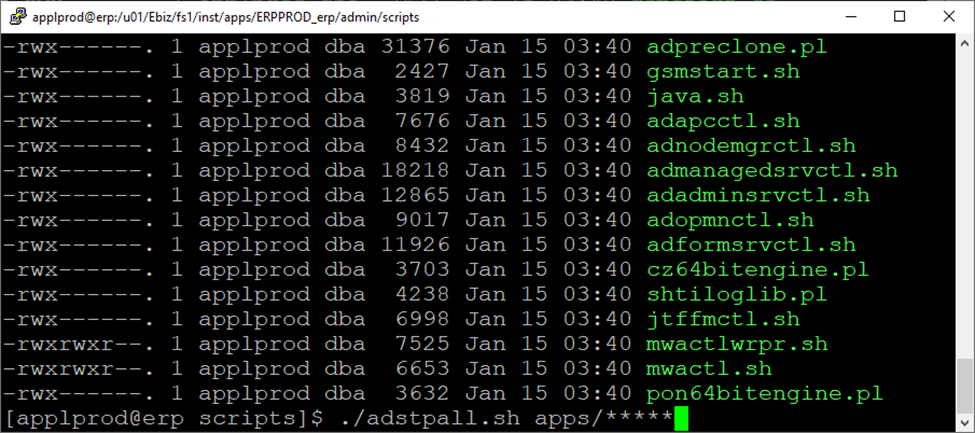
3. cd $ADMIN_SCRIPTS_HOME 4. [applprod@erp scripts]$ pwd
/u01/Ebiz/fs1/inst/apps/ERPPROD_erp/admin/scripts
[applprod@erp scripts]$
5. ./adstpall.sh apps/< password
Enter Weblogic Password when Prompted
Now EBS services will proceed to shut down…….
Ensure All processes are cleared on Linux terminal
Use the command : ps –ef | grep applprod
Except vnc process , Wait for each applprod process to be cleared out itself.
Incase of delay only we may proceed to kill the pending OS applprod processes in order to proceed next.
AFTER SHUTDOWN of All EBS Services including all OS Processes
Perform the TAR Backup of the EBS FileSystem:
Command to run TAR Backup ( For Full Backup of EBS File System ): cd <Backup Direcory> nohup tar -czf [Compressed file name].tgz /u01/Ebiz &
Command to run TAR Backup ( For Cloning Purpose Only – EBS Backup of EBS File System ): cd <Backup Direcory> nohup tar -czf [Compressed file name].tgz /u01/Ebiz/fs1/EBSapps &
NOTE: For cloning purpose, Ensure to run PRECLONE on Apps Tier before EBS Backup:
Steps to START Oracle EBS 12.2.x Application Services:
cd $ADMIN_SCRIPTS_HOME 4. ( a ) To start Weblogic and EBS Services in One Shot [applprod@erp scripts]$ pwd
/u01/Ebiz/fs1/inst/apps/ERPPROD_erp/admin/scripts
[applprod@erp scripts]$ ./adstrtal.sh apps/***** You are running adadminsrvctl.sh version 120.10.12020000.11
Enter the WebLogic Admin password: < Enter the Weblogic password >
Enter the APPS Schema password: < Enter the apps password >
NOTE: ( On the Safe Side ) It is a Good Practice to start the Weblogic Admin before starting EBS Services to ensure there is no Weblogic startup issue. 4. ( b-1 ) To start Weblogic First Alone [applprod@erp scripts]$ pwd
/u01/Ebiz/fs1/inst/apps/ERPPROD_erp/admin/scripts
[applprod@erp scripts]$ ./adadminsrvctl.sh start
You are running adadminsrvctl.sh version 120.10.12020000.11
Enter the WebLogic Admin password: < Enter the Weblogic password >
Enter the APPS Schema password: < Enter the apps password >
Now login to Weblogic Console :
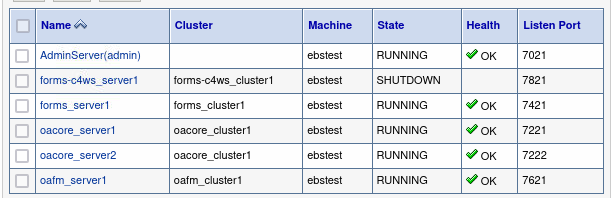
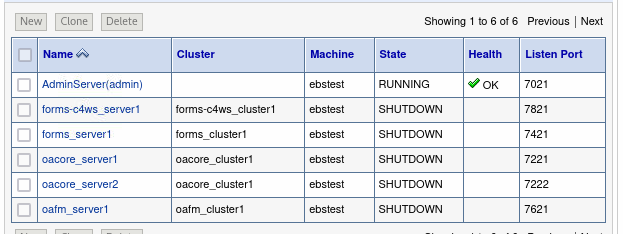
AdminServer-(admin) should be up and running.
4. ( b-2 ) NOW start EBS Services to start the Managed Services ( Forms_server1, oacore_server1 and oaf_server1 ) under the Weblogic Admin Control[applprod@erp scripts]$ pwd
/u01/Ebiz/fs1/inst/apps/ERPPROD_erp/admin/scripts
[applprod@erp scripts]$ ./adstrtal.sh apps/***** You are running adadminsrvctl.sh version 120.10.12020000.11
Enter the WebLogic Admin password: < Enter the Weblogic password > Enter the APPS Schema password: < Enter the apps password > Once All the Services are ensure ( Forms_server1, oacore_server1 and oaf_server1 )that they are RUNNING
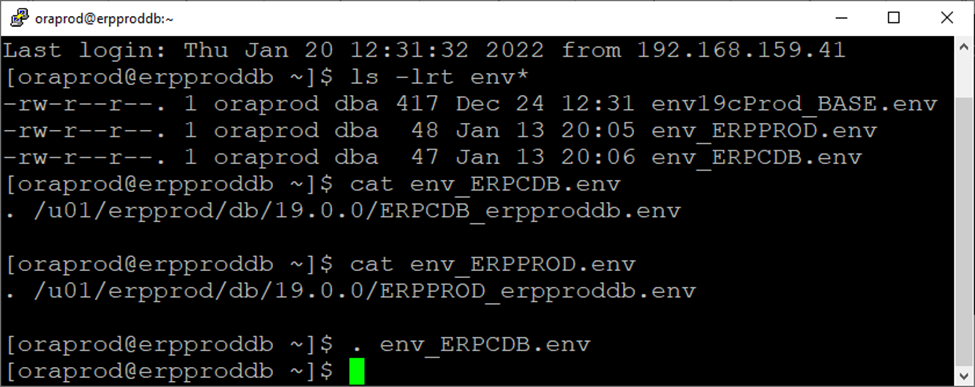
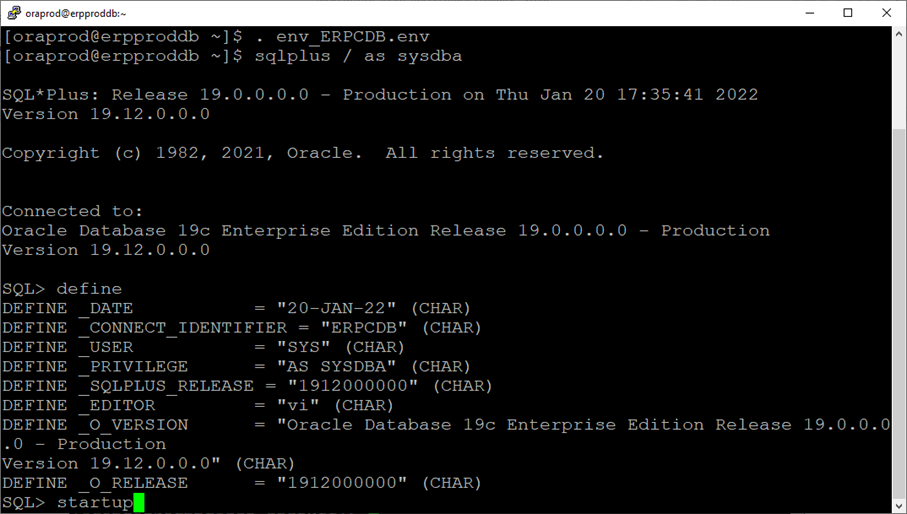
1. Connect Putty to Database Sever IP: 172.10.18.17 2. Login with Database OS User ( Username / password ) 3. Source Container Database Env
. env_filename.env
NOTE: Since there are 2 separate env files ( one for CDB and one for PDB ( EBS Database ) Therefore Environment is not configured to be auto sourced on Login
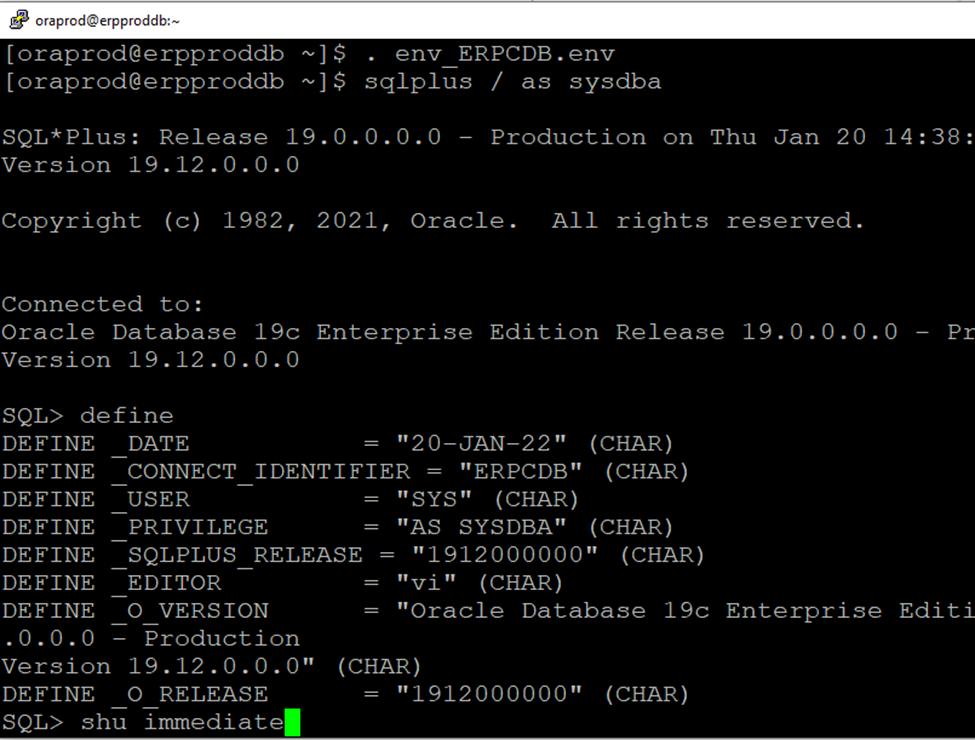
Issue command shu immediate
Since you are connected to Container Database , Shutdown immediate will first shutdown the Pluggable (PDB) EBS Database and then shutdown itself (CDB) at the end.
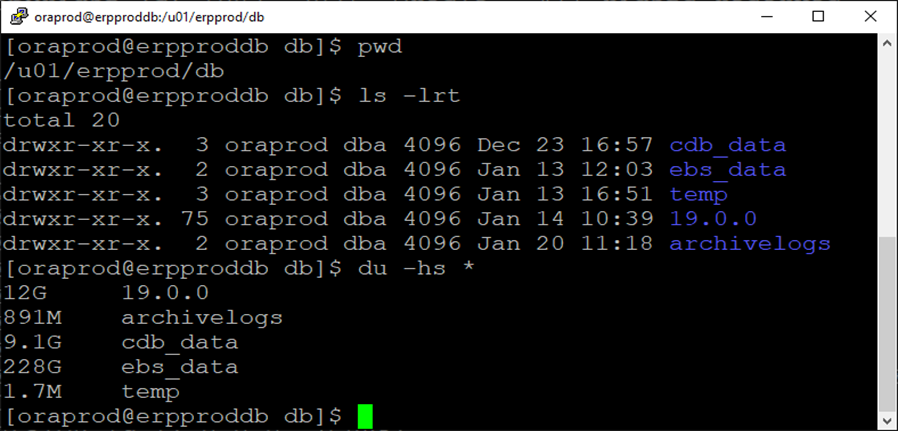
Go to the main directory where all datafiles of CDB and PDB are located.
In my case the dir is “/u01/erpprod/db “
cdb_data = Directory containing Container Data Files ebs_data = Directory containing Pluggable EBS Data Files
19.0.0 is the home directory having 19c binaries.
temp directory is a mandatory directory acting as utl_file directory path location: 19c CDB Database.
ONLY FOR INFORMATION ( REFERENCE SCREENSHOT BELOW)
AFTER SHUTDOWN of All Oracle Database Processes
For Cold Backup of Database ( both CDB and PDB ) This cold Backup may help DBA to recover during a Patching situation on the EBS Application or some major Updates in the Database. Perform the Cold TAR Backup using the below command:
Command to run TAR Backup ( For Full Backup of DB File System including both CDB and PDB ): cd <Backup Direcory> nohup tar -czf [To be name of compressed file].tgz /u01/erpprod/db&
For RMAN online Backup
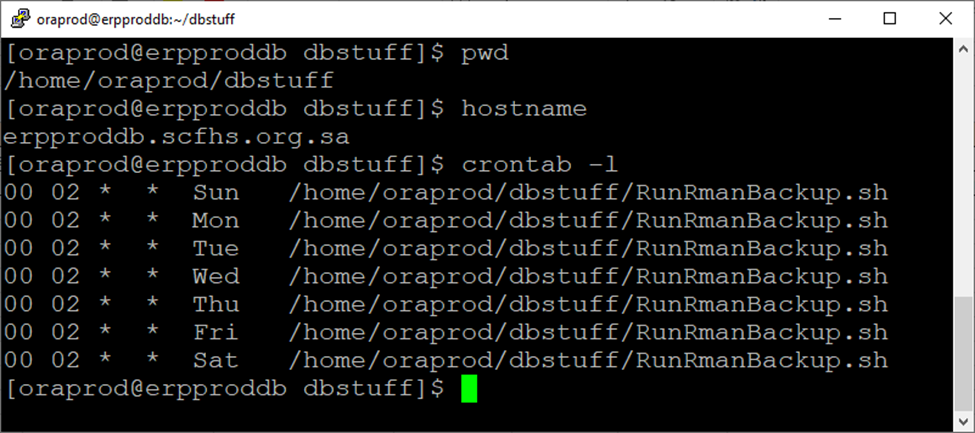
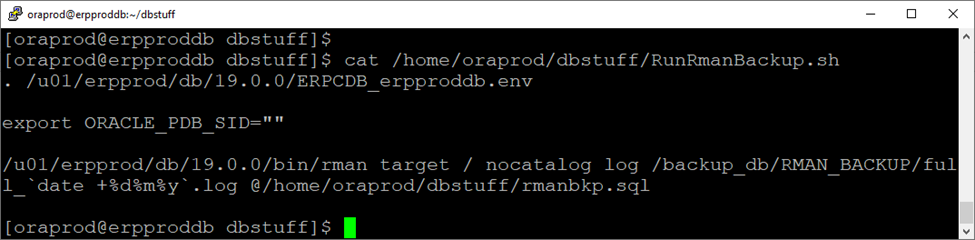
Backup has been already scheduled in Linux crontab – Daily 02:00 AM
( Conditional ) After the patch is applied, You may Synch your patch filesystem by running adop phase=fs_clone Also relevancy of this article must be checked/validated for each / different respective environment like Single / Multiple EBS Nodes etc.
NOTE: One should make use of adop parameters to add with above patch command: Primary App Node: allnodes=no action=db Secondary App Node: allnodes=no action=nodb
Step – 1: Apply All EBS 12.2 relevant Patches to your EBS Application from below JWS MOS Doc: Using Java Web Start with Oracle E-Business Suite(Doc ID 2188898.1)
Step – 2: Enable Java Web Start :
Source EBS Run FS Environment ( 12.2 ) REGENERATE JAR FILES FORCE = YES
Step -3 : UPDATE EBS CONTEXT FILE VALUE OF s_forms_launch_method FROM browser To jws
SOLUTION: Possible areas and tips to review and fix the above issue : Make sure : – Select name from v$active_services and make sure below services are present and configured: ( ebs_PROD, PROD_ebs_patch, PROD) -PDB SID in small letters/Capital letters accordingly present in Ebs DB Ctx File.
Make sure below 19c Database Parameters are properly set: –.local_listener=’hostname.domain:dbport’ in parameter file –.service_names=ERPCDB –.db_domain parameter removed from DB parameter file –.sev_case_sensitive should be false
Change weblogic admin password in ebs 12.2 environment by following the given below Steps.
In EBS Apps DBA Life whenever you prepare a clone of Production ERP System, It is important to change all critical passwords to make it different from Live Production Enviroment.
In this post I have provided steps particularly about how to change the weblogic password before delivering your TEST/Clone environment to Business Users.
SOLUTION:
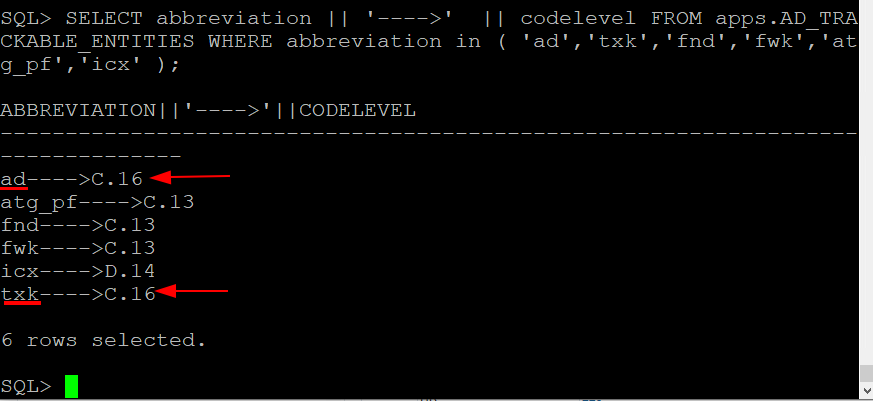
If you are on R12.AD.C.Delta.7 and R12.TXK.C.Delta.7 or later In my case I am onAD/TXK 16 Steps 1: Source EBS 12.2 Run file system
Step 2: adstpall.sh -skipNM -skipAdmin This will stop All EBS Services ( except Weblogic Admin & Node Mgr )
Confirm if all Mid Tier services are in SHUTDOWN state. Enter “Yes” to proceed or anything else to exit: Yes
Step 4: Check if the command completes successfully and admin server is started.
Step 5: Access WLS admin console and try using the new password for Weblogic user.
Step 6: Now run Command: adstrtal.sh
X=========== Recorded Session Below on EBS 12.2.14==========X Full Session performed recently:
Stop Only EBS Services ( Excluding NodeManager and Weblogic Admin ) [appluat@ebstest scripts]$ adstpall.sh -skipNM -skipAdmin You are running adstpall.sh version 120.22.12020000.7 Enter the APPS username: apps Enter the APPS password: Enter the WebLogic Server password:
Skipping Admin Server shutdown as option -skipAdmin is passed Skipping Node Manager shutdown as option -skipNM is passed
All enabled services on this node are stopped. [appluat@ebstest scripts]$
Better to make sure all FND, FNDLIBR, PALIBR, FNDOPP, frmweb processes are cleared on OS Level
========================== Source EBS Run File System Env: [appluat@ebstest scripts]$ . /archive/8010_clone/ebiz/EBSapps.env run E-Business Suite Environment Information File System Type : SINGLE RUN File System : /archive/8010_clone/ebiz/fs1/EBSapps/appl PATCH File System : NOT APPLICABLE Non-Editioned File System : /archive/8010_clone/ebiz/fs_ne
DB Host: ebstest.srrco.gov.sa Service/SID: QSMTEST
Sourcing the RUN File System … [appluat@ebstest scripts]$
============================== Run the Password change command: [appluat@ebstest scripts]$ perl $FND_TOP/patch/115/bin/txkUpdateEBSDomain.pl -action=updateAdminPassword Program: txkUpdateEBSDomain.pl started at Tue Mar 25 11:51:03 2025 AdminServer will be re started after changing WebLogic Admin Password All Mid Tier services should be SHUTDOWN before changing WebLogic Admin Password Confirm if all Mid Tier services are in SHUTDOWN state. Enter “Yes” to proceed or anything else to exit: Yes Enter the full path of Applications Context File [DEFAULT – /archive/8010_clone/ebiz/fs1/inst/apps/QSMTEST_ebstest/appl/admin/QSMTEST_ebstest.xml]: Enter the WLS Admin Password: Enter the new WLS Admin Password: Enter the APPS user password: Executing: /archive/8010_clone/ebiz/fs1/FMW_Home/webtier/perl/bin/perl /archive/8010_clone/ebiz/fs1/EBSapps/appl/ad/12.0.0/patch/115/bin/adProvisionEBS.pl ebs-get-serverstatus -contextfile=/archive/8010_clone/ebiz/fs1/inst/apps/QSMTEST_ebstest/appl/admin/QSMTEST_ebstest.xml -servername=AdminServer -promptmsg=hide -logfile=/archive/8010_clone/ebiz/fs1/inst/apps/QSMTEST_ebstest/logs/appl/rgf/TXK/txkUpdateEBSDomain_Tue_Mar_25_11_51_03_2025/EBSProvisioner.log
Domain updated successfully Restarting AdminServer with new Admin Password.
You are running adadminsrvctl.sh version 120.10.12020000.11 Stopping WLS Admin Server… Refer /archive/8010_clone/ebiz/fs1/inst/apps/QSMTEST_ebstest/logs/appl/admin/log/adadminsrvctl.txt for details AdminServer logs are located at /archive/8010_clone/ebiz/fs1/FMW_Home/user_projects/domains/EBS_domain_QSMTEST/servers/AdminServer/logs adadminsrvctl.sh: exiting with status 0 adadminsrvctl.sh: check the logfile /archive/8010_clone/ebiz/fs1/inst/apps/QSMTEST_ebstest/logs/appl/admin/log/adadminsrvctl.txt for more information … You are running adnodemgrctl.sh version 120.11.12020000.12 NodeManager log is located at /archive/8010_clone/ebiz/fs1/FMW_Home/wlserver_10.3/common/nodemanager/nmHome1 adnodemgrctl.sh: exiting with status 0 adnodemgrctl.sh: check the logfile /archive/8010_clone/ebiz/fs1/inst/apps/QSMTEST_ebstest/logs/appl/admin/log/adnodemgrctl.txt for more information …
You are running adadminsrvctl.sh version 120.10.12020000.11
Starting WLS Admin Server… Refer /archive/8010_clone/ebiz/fs1/inst/apps/QSMTEST_ebstest/logs/appl/admin/log/adadminsrvctl.txt for details AdminServer logs are located at /archive/8010_clone/ebiz/fs1/FMW_Home/user_projects/domains/EBS_domain_QSMTEST/servers/AdminServer/logs adadminsrvctl.sh: exiting with status 0
adadminsrvctl.sh: check the logfile /archive/8010_clone/ebiz/fs1/inst/apps/QSMTEST_ebstest/logs/appl/admin/log/adadminsrvctl.txt for more information …
* IMPORTANT ** WebLogic Admin Password is changed. Restart all application tier services using control scripts.
Inside generateMimeMappingsPropFile()…
/archive/8010_clone/ebiz/fs1/FMW_Home/user_projects/domains/EBS_domain_QSMTEST/config/mimemappings.properties already exists, updating it.
Inside updateMimeMappingsPropFile()…
Inside resetExistingMimeMappings()…
Overwriting the value for the parameter: xps Overwriting the value for the parameter: png Overwriting the value for the parameter: xml Overwriting the value for the parameter: js Overwriting the value for the parameter: svg Overwriting the value for the parameter: swf
Reset of mime mappings completed.
Inside addMimeMappings()…
Adding of mime mappings completed. Taking backup of existing mimemappings.properties.
SOURCE : /archive/8010_clone/ebiz/fs1/FMW_Home/user_projects/domains/EBS_domain_QSMTEST/config/mimemappings.properties_temp TARGET : /archive/8010_clone/ebiz/fs1/FMW_Home/user_projects/domains/EBS_domain_QSMTEST/config/mimemappings.properties /archive/8010_clone/ebiz/fs1/FMW_Home/user_projects/domains/EBS_domain_QSMTEST/config/mimemappings.properties updated successfully. Program: txkUpdateEBSDomain.pl completed at Tue Mar 25 11:55:38 2025 [appluat@ebstest scripts]$
================== Stop Weblogic after Pwd Change [appluat@ebstest scripts]$ ./adadminsrvctl.sh stop
You are running adadminsrvctl.sh version 120.10.12020000.11
Enter the WebLogic Admin password: Enter the APPS Schema password: Stopping WLS Admin Server… Refer /archive/8010_clone/ebiz/fs1/inst/apps/QSMTEST_ebstest/logs/appl/admin/log/adadminsrvctl.txt for details AdminServer logs are located at /archive/8010_clone/ebiz/fs1/FMW_Home/user_projects/domains/EBS_domain_QSMTEST/servers/AdminServer/logs adadminsrvctl.sh: exiting with status 0 adadminsrvctl.sh: check the logfile /archive/8010_clone/ebiz/fs1/inst/apps/QSMTEST_ebstest/logs/appl/admin/log/adadminsrvctl.txt for more information … [appluat@ebstest scripts]$
=======================
Start Weblogic with recently changed new password [appluat@ebstest scripts]$ ./adadminsrvctl.sh start You are running adadminsrvctl.sh version 120.10.12020000.11 Enter the WebLogic Admin password: Enter the APPS Schema password: Starting WLS Admin Server… Refer /archive/8010_clone/ebiz/fs1/inst/apps/QSMTEST_ebstest/logs/appl/admin/log/adadminsrvctl.txt for details AdminServer logs are located at /archive/8010_clone/ebiz/fs1/FMW_Home/user_projects/domains/EBS_domain_QSMTEST/servers/AdminServer/logs adadminsrvctl.sh: exiting with status 0 adadminsrvctl.sh: check the logfile /archive/8010_clone/ebiz/fs1/inst/apps/QSMTEST_ebstest/logs/appl/admin/log/adadminsrvctl.txt for more information … [appluat@ebstest scripts]$
=============
Start EBS App Services now
[appluat@ebstest scripts]$ ./adstrtal.sh You are running adstrtal.sh version 120.24.12020000.11 Enter the APPS username: apps Enter the APPS password: ***** Enter the WebLogic Server password: New Password we changed
============== Important NOTE: We can use the following approach to update the Weblogic admin server password if you are on an earlier version of R12.AD.C.Delta.7 or R12.TXK.C.Delta.7.
A) Access the WebLogic Administrative Console by logging in. B) Select Domain after selecting Lock & Edit. C) Select the Advanced tab after selecting the Security tab. D) In the Node Manager Password field, provide the new password you wish to use for the WebLogic Admin User. E) Click Save, then confirm that the settings were correctly changed. Next, choose “Activate Changes.” F) Select Myrealm after selecting Security Realms. G) Choose Users and Groups, then Weblogic User. Then, type the new WebLogic user password. H) Verify that the settings have been correctly modified.
For reference you can check the given below DOC ID of My oracle support. MOS Doc ID 2178617.1











 Visit Today : 39
 Visit Yesterday : 36
 This Month : 698
 This Year : 1918
 Total Visit : 9314
 Hits Today : 53
 Total Hits : 12294
 Who's Online : 1