

The Scenario:
I was recently upgrading an Oracle E-Business Suite 12.2.10 environment from Oracle Database 19c (19.32) to Oracle AI Database 26ai (23.26.3) on a single node. Following the official KA1452 upgrade guide, I reached Section 6: Post-Upgrade Tasks, specifically step 6.6 to generate the new database context file and run AutoConfig.
The Problem
-Upgrading Oracle E-Business Suite Release 12.2 to Oracle AI Database 26ai (Single Node) KA1452
–Section 6: Post-Upgrade Tasks
— 6.6 Generate new database context file and run AutoConfig
After running adrevoke ( was not sure till that moment if the revoke caused the issue )
@/u01/ebs/fs2/EBSapps/appl/ad/12.0.0/patch/115/sql/adrevoke.sql apps
No Problem till this step. However moving forward with Post PDB Creation TASK (txkpostpdbcreationtasks.pl script)
SAMPLE TEMPLATE ( As per Oracle Doc )
$ cd $ORACLE_HOME/appsutil
$ . ./txkSetCfgCDB.env dboraclehome=
$ perl $ORACLE_HOME/appsutil/bin/txkPostPDBCreationTasks.pl -dboraclehome=
-outdir=/appsutil/log -cdbsid= -pdbsid= -appsuser=apps -dbport= -servicetype=onpremise -dbuniquename=
ACTUAL ( My Case ) :
cd /u01/db/26.0.0/appsutil
. ./txkSetCfgCDB.env dboraclehome=/u01/db/26.0.0
perl /u01/db/26.0.0/appsutil/bin/txkPostPDBCreationTasks.pl -dboraclehome=/u01/db/26.0.0 -outdir=/u01/db/26.0.0/appsutil/log -cdbsid=ERPCDB -pdbsid=ERPPROD -appsuser=apps -dbport=1521 -servicetype=onpremise -dbuniquename=ERPCDB
which completed with below error:
EXIT STATUS: 1
Invalid APPS database user credentials.
LOG FILE: /u01/db/26.0.0/appsutil/log/TXK_POST_PDB_Mon_Sep_7_12_31_51_2026/validate_apps_password.log.
FATAL ERROR
PROGRAM : (/u01/db/26.0.0/appsutil/bin/txkPostPDBCreationTasks.pl)
TIME : Mon Sep 7 12:39:04 2026
FUNCTION: main::validateAppsSchemaCredentials [ Level 1 ]
ERRORMSG: Invalid APPS database user credentials.
FATAL ERROR
PROGRAM : (/u01/db/26.0.0/appsutil/bin/txkPostPDBCreationTasks.pl)
TIME : Mon Sep 7 12:39:04 2026
FUNCTION: main::validateAppsSchemaCredentials [ Level 1 ]
ERRORMSG: Invalid APPS database user credentials.
[applprod@ebs (scripts)]$ 08:10:08 > sqlplus apps/appsadmin@ERPPROD
SQL Plus: Release 10.1.0.5.0 – Production on Mon Sep 7 12:44:16 2026
Copyright (c) 1982, 2005, Oracle. All rights reserved.
ERROR:
ORA-01017: invalid credential or not authorized; logon denied
ROOT CAUSE:
After digging into the logs and reviewing my environment, I found the culprit. My APPS schema password was set entirely in lowercase ‘appsadmin’
SOLUTION:
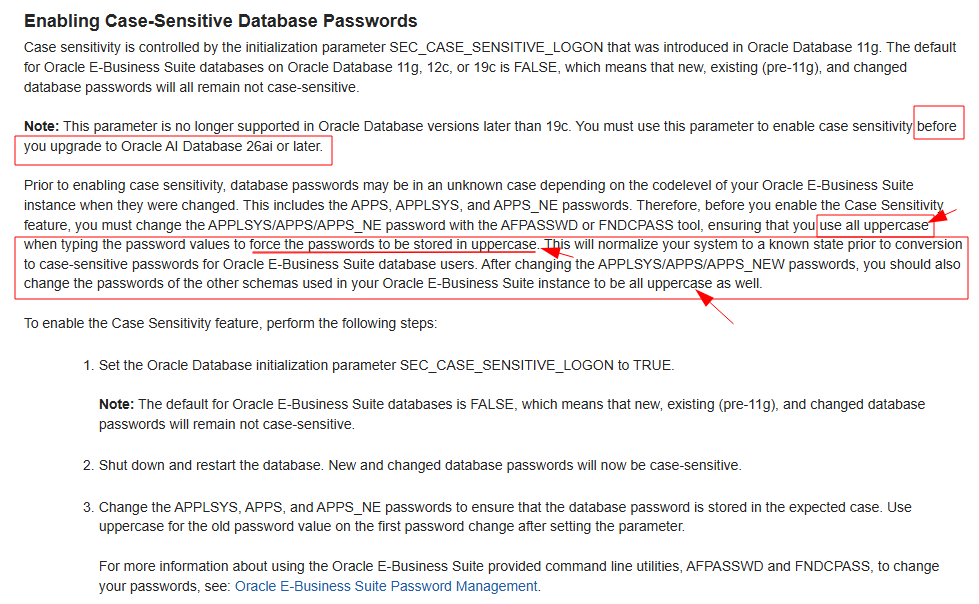
Before the 26ai upgrade, change the APPS password from: ‘appsadmin’ → ‘APPS’ ( UPPER CASE Completely ) using an EBS-supported utility such as ‘FNDCPASS’ or ‘AFPASSWD’.
This puts the password in a known and consistent state ( specially during this transition phase of moving from 19c to 26ai ), ensuring that EBS and Oracle Database 26ai use the same password format.
NOTE: In my case, the existing password for my APPS schema was in lowercase: ‘appsadmin’
Therefore, I changed it completely to UPPERCASE : ‘APPS’
This ensures that the password case is consistent with the way EBS expects to authenticate after the Oracle Database 26ai upgrade.
In short: We must change the APPS schema password (via ‘FNDCPASS’ or ‘AFPASSWD’) to uppercase before the upgrade to prevent password-case mismatches and avoid an EBS Application Apps schema outage after moving to 26ai.
REFERENCE:
As per Doc: KA1151 – Interoperability Notes Oracle EBS 12.2 with Oracle AI Database 26ai
Section 2: Performing Pre-Upgrade Tasks ( Point #: 2.4 – Enable case-sensitive passwords )
https://docs.oracle.com/cd/E26401_01/doc.122/e22954/T202991T174305.htm#T578669


 Visit Today : 24
 Visit Yesterday : 44
 This Month : 1010
 This Year : 10190
 Total Visit : 17586
 Hits Today : 35
 Total Hits : 22490
 Who's Online : 2
Thanks for highlighting this issue, as many DBA’w are facing this issue while upgrade to 26ai